Logo
MINECRAFTBIBLE
Items
Items

All game items

Blocks
Blocks

Building blocks

Mobs
Mobs

Creatures & monsters

Biomes
Biomes

World biomes

Structures
Structures

Generated structures

Recipes
Recipes

Crafting guides

Advancements
Advancements

Achievements

Loot Tables
Loot Tables

Drop rates

Tags
Tags

Item groupings

All Versions
View all data →
Capes
Cape ArchiveNEW

Browse rare Minecon capes, OptiFine capes, and custom capes from players worldwide

Browse

Player Database
Player DatabasePopular

Search any player

Skin Browser
Skin Browser

Browse & download skins

Cape Gallery
Cape GalleryNEW

Minecon & OptiFine capes

Seed Vault
Seed Vault

Curated seeds

Learn

Guides
GuidesNew

Tutorials & tips

Blog
Blog

News & updates

Community

Community Hub
Community HubHub

Posts, discussions & more

All Versions
View community →
Seed Analyzer
Seed Analyzer

World seed analysis

Loot Explorer
Loot Explorer

Drop rates

Crafting Calculator
Crafting Calculator

Material planning

Enchant Calculator
Enchant Calculator

Probability math

Redstone Lab
Redstone Lab

Signal timing

Trading Profit
Trading Profit

Villager ROI

All Versions
View all tools →
Mods
Mods

Browse all mods

Plugins
Plugins

Server plugins

Resource Packs
Resource Packs

Textures & sounds

Shaders
Shaders

Visual enhancements

Datapacks
Datapacks

World logic

Scanner
Mod Intelligence

Scan & analyze any mod

All Versions
View all mods →
Loading...
IntroductionIntroductionVersion HistoryVersion HistoryGuidesGuidesBlog & NewsBlog & News
ItemsItemsBlocksBlocksMobsMobsRecipesRecipesBiomesBiomesStructuresStructuresAdvancementsAdvancementsLoot TablesLoot TablesTagsTags
ModsModsPluginsPluginsResource PacksResource PacksShadersShadersDatapacksDatapacks

MinecraftBible

The Ultimate Wiki

Logo
MINECRAFTBIBLE

The ultimate Minecraft reference. Every item, block, mob, and recipe documented with precision.

Community

  • Skin Browser
  • Cape Gallery
  • Seed Vault
  • Blog
  • Guides

Database

  • Items
  • Blocks
  • Mobs
  • Recipes
  • Biomes
  • Structures

Tools

  • Seed Analyzer
  • Mod Intelligence
  • Crafting Calculator
  • Enchant Calculator

Mods & Packs

  • Mods
  • Plugins
  • Resource Packs
  • Shaders
  • Datapacks

Site & Legal

  • About
  • Authors
  • Editorial Policy
  • Corrections
  • Contact
  • Privacy Policy
  • Terms of Service
  • DMCA
  • Sitemap

© 2026 MinecraftBible. Not affiliated with Mojang or Microsoft.

PrivacyTermsContact
Arda's Uncrafting Table [ Uncraft / Recycle / Deconstruct Mod ]

ModLicenseRef-All-Rights-Reserved

Arda's Uncrafting Table [ Uncraft / Recycle / Deconstruct Mod ]
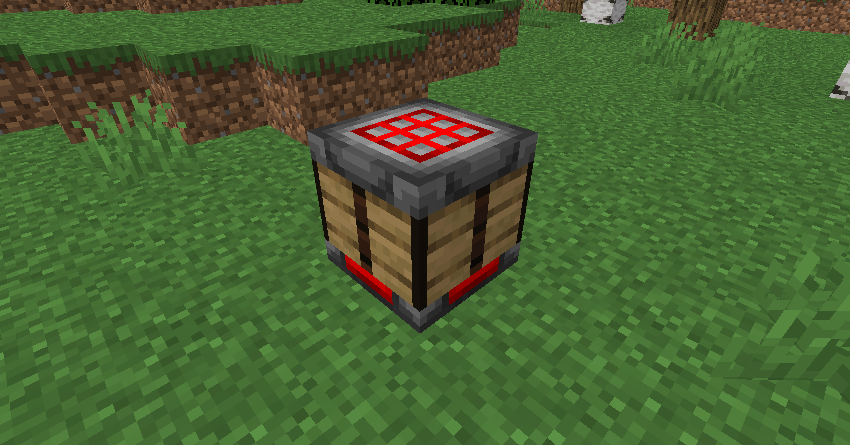
Arda's Uncrafting Table allows you to reverse crafting recipes seamlessly. Retrieve ingredients from unused items, supports damaged tools with a fair probability system, and works automatically with both vanilla and modded recipes.

602
Downloads
4
Followers
4 months ago
Updated
📦
3
Versions
economystoragetechnologyfabricforgeneoforge
Download Latestv1.0View on Modrinth

📖About Arda's Uncrafting Table [ Uncraft / Recycle / Deconstruct Mod ]
Header


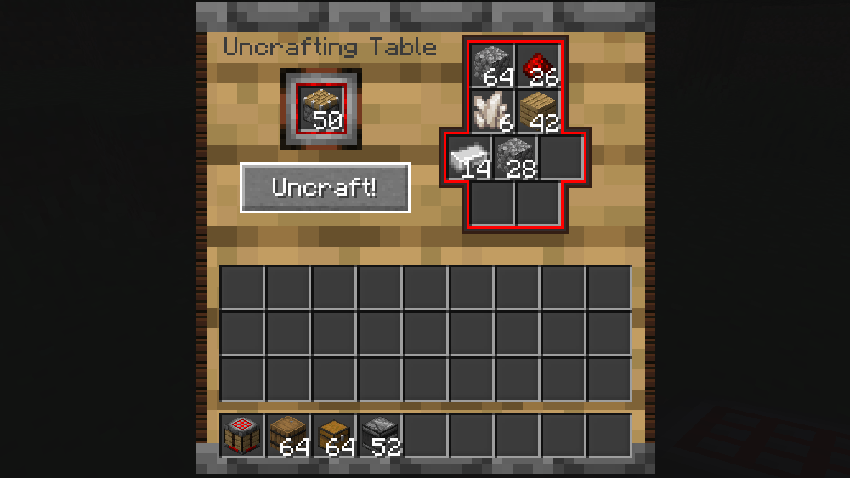
Have you ever crafted the wrong item by mistake, or do you have chests full of loot you will never use? Arda's Uncrafting Table is the solution. This mod introduces a functional utility block that allows you to reverse the crafting process, turning finished items back into their original ingredients.

Key Features
1. Universal Uncrafting

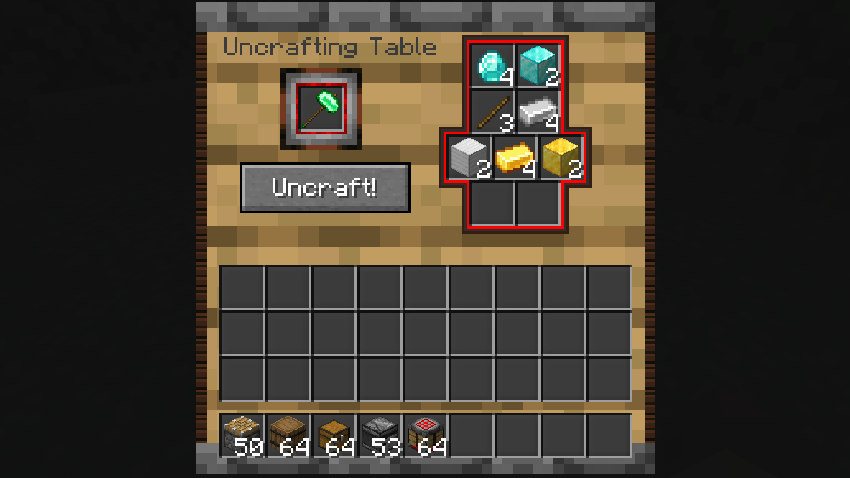
The mod hooks directly into the Minecraft recipe manager. This means it works not only with vanilla items (like Diamond Pickaxes or Gold Armor) but also with items from other mods that use the standard crafting table. If it has a recipe, it can likely be uncrafted.

2. Smart Durability System

The uncrafting logic is balanced to prevent exploitation. You cannot simply craft a tool, use it until it nearly breaks, and get full resources back.

  • Perfect Condition: If an item is fully repaired, you get 100% of the ingredients back.
  • Damaged Items: The mod calculates the remaining durability percentage. Each ingredient has a chance to be returned based on this percentage.
  • Example: If a Diamond Pickaxe has 50% durability left, there is exactly a 50% chance for each diamond and stick to be returned.

3. Fair Exchange Mechanics

The mod respects recipe output counts. If a crafting recipe yields 4 items (e.g., Stairs or Torches), you must place exactly 4 of those items into the input slot to retrieve the ingredients. This prevents material duplication.

4. Safety & Overflow Protection

No items are lost. If the output slots in the Uncrafting Table are full, or if the resulting ingredients do not fit, the excess items will automatically drop at the player's feet.


How to Use

  1. Craft the Uncrafting Table (Recipe matches standard crafting tables but with a unique twist, check JEI/REI for details).
  2. Place the item you wish to dismantle in the Input Slot (left side).
  3. Ensure the item is uncraftable (it must have a valid crafting recipe).
  4. Click the Uncraft button.
  5. Collect your materials from the output grid.

Technical Details

  • Server-Side Execution: All logic runs on the server to prevent "ghost items" or desynchronization issues.
  • Sound Effects: Features immersive mechanical sounds (Grindstone effects) when processing items.
  • Compatibility: Fully compatible with NeoForge 1.21.1.

Download today and stop wasting your valuable resources!

👥 Team & Contributors

Ixra
IxraOwner

⚙️ Compatibility

Environment
✅ Client & Server
Loaders
fabricforgeneoforge
Minecraft Versions
1.20.1

🔗 Links

Modrinth Page