Logo
MINECRAFTBIBLE
Items
Items

All game items

Blocks
Blocks

Building blocks

Mobs
Mobs

Creatures & monsters

Biomes
Biomes

World biomes

Structures
Structures

Generated structures

Recipes
Recipes

Crafting guides

Advancements
Advancements

Achievements

Loot Tables
Loot Tables

Drop rates

Tags
Tags

Item groupings

All Versions
View all data →
Capes
Cape ArchiveNEW

Browse rare Minecon capes, OptiFine capes, and custom capes from players worldwide

Browse

Player Database
Player DatabasePopular

Search any player

Skin Browser
Skin Browser

Browse & download skins

Cape Gallery
Cape GalleryNEW

Minecon & OptiFine capes

Seed Vault
Seed Vault

Curated seeds

Learn

Guides
GuidesNew

Tutorials & tips

Blog
Blog

News & updates

Community

Community Hub
Community HubHub

Posts, discussions & more

All Versions
View community →
Seed Analyzer
Seed Analyzer

World seed analysis

Loot Explorer
Loot Explorer

Drop rates

Crafting Calculator
Crafting Calculator

Material planning

Enchant Calculator
Enchant Calculator

Probability math

Redstone Lab
Redstone Lab

Signal timing

Trading Profit
Trading Profit

Villager ROI

All Versions
View all tools →
Mods
Mods

Browse all mods

Plugins
Plugins

Server plugins

Resource Packs
Resource Packs

Textures & sounds

Shaders
Shaders

Visual enhancements

Datapacks
Datapacks

World logic

Scanner
Mod Intelligence

Scan & analyze any mod

All Versions
View all mods →
Loading...
IntroductionIntroductionVersion HistoryVersion HistoryGuidesGuidesBlog & NewsBlog & News
ItemsItemsBlocksBlocksMobsMobsRecipesRecipesBiomesBiomesStructuresStructuresAdvancementsAdvancementsLoot TablesLoot TablesTagsTags
ModsModsPluginsPluginsResource PacksResource PacksShadersShadersDatapacksDatapacks

MinecraftBible

The Ultimate Wiki

Logo
MINECRAFTBIBLE

The ultimate Minecraft reference. Every item, block, mob, and recipe documented with precision.

Community

  • Skin Browser
  • Cape Gallery
  • Seed Vault
  • Blog
  • Guides

Database

  • Items
  • Blocks
  • Mobs
  • Recipes
  • Biomes
  • Structures

Tools

  • Seed Analyzer
  • Mod Intelligence
  • Crafting Calculator
  • Enchant Calculator

Mods & Packs

  • Mods
  • Plugins
  • Resource Packs
  • Shaders
  • Datapacks

Site & Legal

  • About
  • Authors
  • Editorial Policy
  • Corrections
  • Contact
  • Privacy Policy
  • Terms of Service
  • DMCA
  • Sitemap

© 2026 MinecraftBible. Not affiliated with Mojang or Microsoft.

PrivacyTermsContact
Animated Inventory
ModLicenseRef-All-Rights-Reserved

Animated Inventory

Adds cute animations to your survival inventory!

14.4K
Downloads
60
Followers
4 months ago
Updated
📦
11
Versions
decorationgame-mechanicsstoragefabricneoforge
Download Latestv1.3.1+neoforgeView on Modrinth

📖About Animated Inventory

Animated Inventory - Animated Inventory Version

Banner

Animated Inventory does exactly as the name describes, animates things in the inventory. Giving the inventory some more life and activity.

Animated Inventory is one of my favorite mods due to the amount of customizability it has.
There is only a few themes to choose from:

  • Froggy
  • Christmas
  • Slime
  • WIP Forest
  • WIP Ocean
  • WIP Factory
  • WIP Cat

Each one has it's own style and feel to it and I plan to add more soon <3

If you have any ideas for a custom inventory or have art submission for one feel free to join my discord and tell me about it!

How To Use

When you first install the mod make sure to have Fabric API, Mod Menu, and Cloth Config. If you are using NeoForge ensure you just have Cloth Config!

Once your game has booted you can click on the "Mods" button and then find and click on "Animated Inventory". Here you can modify the mods settings.

Quick Setting Rundown

  • Animation State - Enabled, Paused, Disabled
  • Inventory Theme - Froggy, Christmas, WIP Forest, WIP Ocean, WIP Factory
  • GUI Texture Level - Custom Inventory, Vanilla Inventory
  • Vivid Textures - Yes/No

Detailed Settings Overview

Detailed Settings
  • Animation State
    • Enabled - All animations will play as normal
    • Paused - All animations will no longer tick
    • Disabled - All animations will no longer render
  • Inventory Theme
    • Froggy - A cute frog theme
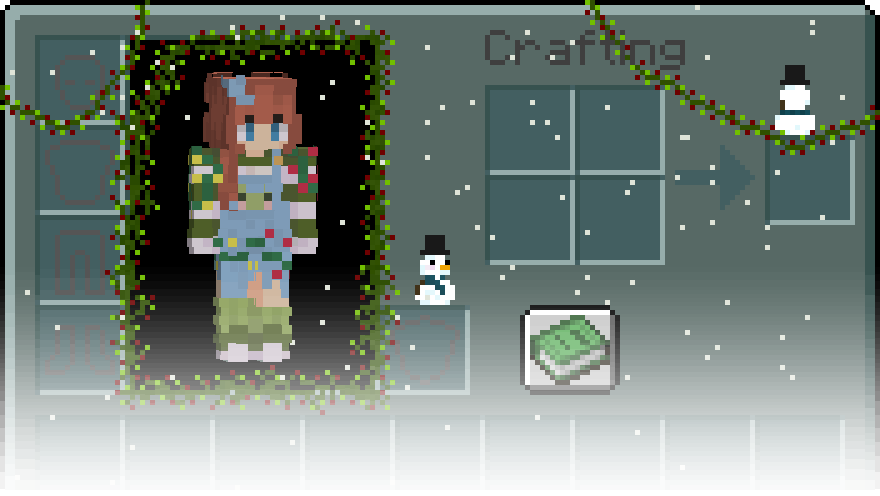
    • Christmas - A theme to give you the Christmas cheer!
    • Forest WIP - My rough sketch of a more nature-esc theme
  • GUI Texture Level
    • Custom Inventory - Allows the mod to use it's default inventory theme
      • The theme only applies to the survival inventory... for now!
    • Vanilla Inventory - Allows any texture pack you have to do it's thing
  • Vivid Textures
    • Some textures have a slight overlay to make them blend in a bit more, this removes that!

If you load into a game the animated inventory will start in your Survival inventory only! At least for now <3 If enough people seem to care I will finish my efforts of adding it to all the inventories.

Do note, some things are interactable! Perhaps frogs...

Future mod updates and progress will be posted in my discord!

👥 Team & Contributors

Mike
MikeOwner

⚙️ Compatibility

Environment
💻 Client-side
Loaders
fabricneoforge
Minecraft Versions
1.20.4

🔗 Links

Modrinth Page