


AI Player
A minecraft mod which aims to add a "second player" into the game which will actually be intelligent.
📖About AI Player
Read this section please.
This project so far is the result of thousands of hours of endless reasearch, trials and errors, and just the simple goal of eliminating loneliness from minecraft as much as possible.
If you liked my work, please consider donating so that I can continue to work on this project in peace and can actually prove to my parents that my work is making a difference. (Also not having to ask for pocket money from mom).
Just know that I won't ever give up on this project.
Buy me a coffee
https://buymeacoffee.com/shasankp000
Paypal
Current stage of the mod
Since the new semester in my college has started this month, I am gonna be under really heavy pressure, since I have to study 11 subjects in total (Machine learning, Linear Algebra, Physics, CyberSecurity, and a lot more lol). Don't worry though I won't stop working on this project, it's just that the updates will be quite slower.
It's understandable if y'all leave by then or give up on this project, so, I won't mind. :))
Thank you all from the core of my heart for the support so far. I never imagined we would come this far.
Latest Update: 21/8/2025 at 04:08 AM IST (Indian Standard Time)
Please have patience while waiting for updates. Since I am the only guy working on this project, it does take me time to address all the issues/add in new features.
Changelog v1.0.5.2-release+1.21.1
Important: Earlier proposed second part features will be added in the next patch and this new update marks the end of support for 1.20.6 and below.
Thanks to https://github.com/arichornlover AI Player has now been updated to version 1.21.1
This minor update of AI player updates the mod to version 1.21.1 and also brings support for other custom API providers.
Custom OpenAI-Compatible Provider Support
This feature allows you to use alternative AI providers that are compatible with the OpenAI API standard, such as OpenRouter, TogetherAI, Perplexity, and others.
How to Use
1. Enable Custom Provider Mode
Set the system property(JVM argument) when launching the game:
-Daiplayer.llmMode=custom
2. Configure API Settings
- Firstly, delete the existing settings.json5 in the config folder (save any api keys elsewhere for the meantime)
- Open the in-game API Keys configuration screen (
/configMan) and then click the API Keys button. - Set the following fields:
- Custom API URL: The base URL of your provider (e.g.,
https://openrouter.ai/api/v1) - Custom API Key: Your API key for the provider
- Custom API URL: The base URL of your provider (e.g.,
- Hit save. In case you don't see the list of models immediately hit the "Refresh Models" button once or twice.
- If you still don't see the list of models, close the config manager, type
/configManagain and you should see the list of models available. - ollama is still required to be open in the background because of the embedding model being used, but I will separate this entirely in the next mini patch, by adding an embedding api endpoint from the providers, and also upgrading to the
embedddinggemmamodel fromnomic-embed-text
3. Select a Model
The system will automatically fetch available models from your provider's /models endpoint and display them in the model selection interface.
Supported Providers
Any provider that implements the OpenAI API standard should work. Some examples:
- OpenRouter:
https://openrouter.ai/api/v1 - TogetherAI:
https://api.together.xyz/v1 - Perplexity:
https://api.perplexity.ai/ - Groq:
https://api.groq.com/openai/v1 - Local LM Studio:
http://localhost:1234/v1
API Compatibility
The custom provider implementation uses the following OpenAI API endpoints:
GET /models- For fetching available modelsPOST /chat/completions- For sending chat completion requests
Your provider must support these endpoints with the same request/response format as OpenAI's API.
Troubleshooting
- "Custom provider selected but no API URL configured": Make sure you've set the Custom API URL field
- "Custom API key not set in config!": Make sure you've set the Custom API Key field
- Empty model list: Check that your API key is valid and the URL is correct
- Connection errors: Verify that the provider URL is accessible and supports the OpenAI API format
Changelog v1.0.5.1-release+1.20.6-bugfix-2
- Fixed a lot of bugs that got overlooked in the previous testing phase.
Changelog v1.0.5.1-release+1.20.6
I realized that many of the commitments made in the previous announcement were too ambitious to implement in a single update. To keep development smooth, this release is the first part of a two-part update.
This update focuses on core system rewrites and better AI decision-making, laying the foundation for the next wave of features.
Also support for versions below 1.20.6 has been dropped due to codebase changes that I simply can't handle migrating by myself. However others are free to port to lower versions.
Upcoming second part will have the update in 1.20.6 as the final update for 1.20.6 and also will have a new update to directly 1.21.6 where hence the future versions will continue onwards.
What's New in 1.0.5.1
Revamped NLP System
- Fully redesigned Natural Language Processing (NLP) — no more "I couldn’t understand you."
- This is a new and experimental system I’ve been designing and rigorously testing over the last month.
- Results are promising, but not yet up to my personal standards — expect further refinements in future updates.
Rewritten RAG & Database System (with Web Search)
- New Retrieval-Augmented Generation (RAG) system integrated with a database and web search.
- The AI now provides accurate factual information about Minecraft, drastically reducing hallucinations.
- Supported search providers:
- Gemini API
- Serper API
- Brave Search API (in development, will push this to the next patch instead)
Meta-Decision Layer
- Added a task chaining system:
- You give a high-level instruction → the bot automatically breaks it into smaller tasks → executes step by step.
Current Supported Tasks:
- Go to a location
- Go to a location and mine resources
- Detect nearby blocks & entities
- Report stats (health, oxygen, hunger, etc.)
API Integrations
AI Player now supports multiple LLM providers (configurable via API keys):
- OpenAI
- Anthropic Claude
- Google Gemini
- xAI Grok
Web Search Tool
If you select the Gemini Search as the web search tool for the LLM, it will use the API key you have set as your LLM provider in the settings.json5 file automatically.
For https://serper.dev/ search, get an api key from serper.dev and then navigate to the config folder in game, open the ai_search_config.json and put the key:

(Note: I couldn’t test all of these myself except the Gemini API since API keys are costly, but the integrations are ready.)
Bugfixes
- Fixed bug where JVM arguments were not being read.
- Removed owo-lib. AI-Player now uses an in-house config system.
- Fixed API keys saving issues.
- Added a new Launcher Detection System. Since Modrinth launcher was conflicting by it's own variables path system so the QTable was not being loaded. Supports: Vanilla MC Launcher, Modrinth App, MultiMC, Prism Launcher, Curseforge launcher, ATLauncher, and even unknown launchers which would be unsupported by default, assuming they follow the vanilla mc launcher's path schemes.
- Revamped the Config Manager UI with a responsive UI along with a search option for providers with a lot of models (like gemini).
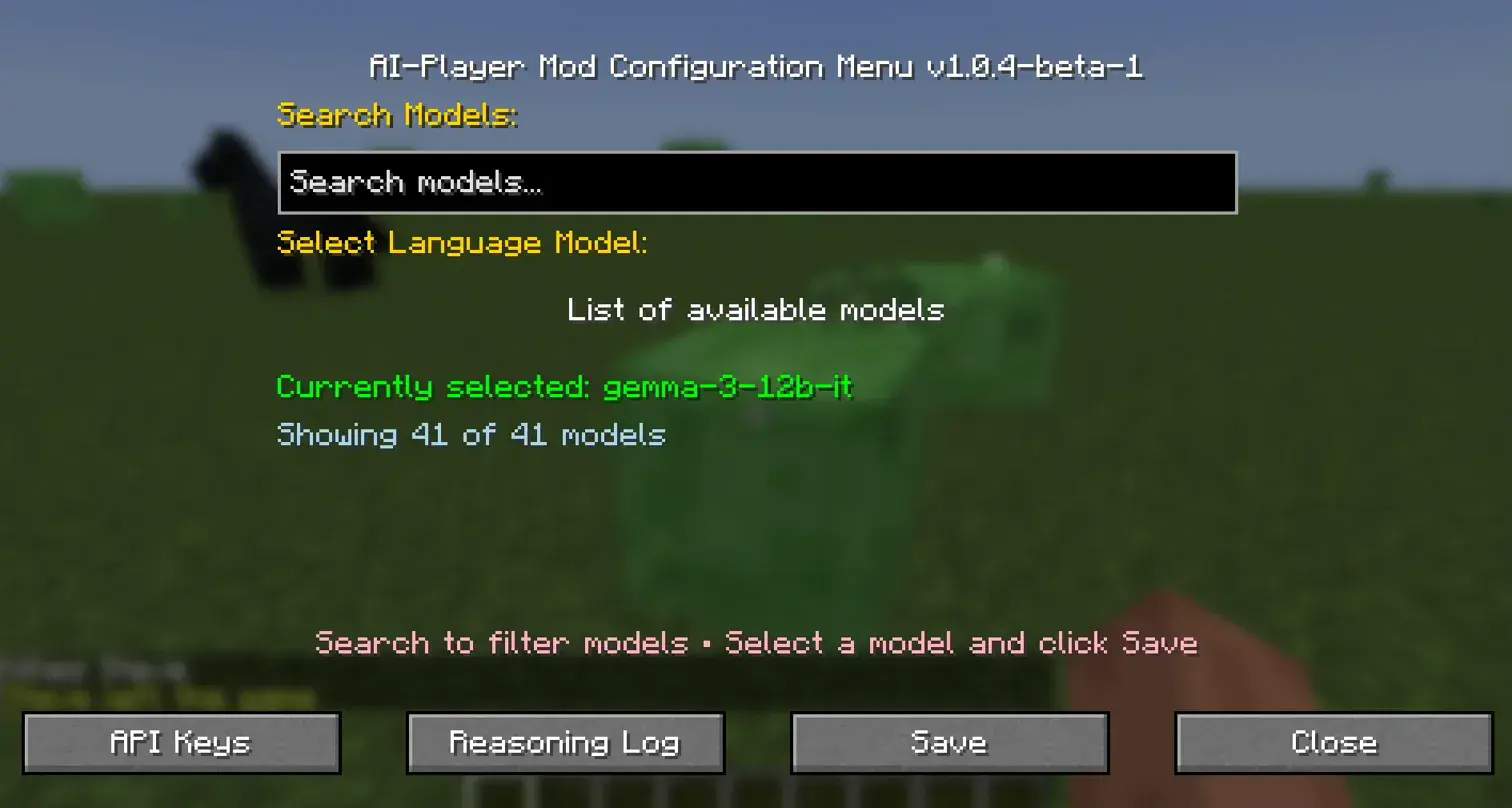
Development Notes
- While this update may look small on the surface, designing the systems, writing the code, and debugging took a huge amount of time.
- On top of this, I’ve picked up more freelance contracts and need to focus on my final-year project.
- Updates will continue — just at a slower pace.
Coming Soon in Part 2
Here’s what’s planned for the next patch:
Combat & Survival Enhancements
- Bot uses weapons (including ranged) to fend off mobs.
- Reflex module upgrades.
- More natural world interactions (e.g., sleeping at night).
Improved Path Tracer
- Smarter navigation through water and complex terrain.
Self-Goal Assignment System
- Bot assigns itself goals like a real player.
- Will initiate conversations with players and move autonomously.
Mood System (design phase)
- Adds emotional context and varied behavior.
Player2 Integration
- Highly requested — this will be the first major feature of the second update.
Upcoming changes (some of them might be seen in the second patch).
- Switch to Deep-Q learning instead of traditonal q-learning (TLDR: use a neural network instead of a table)
- Create custom movement code for the bot for precise movement instead of carpet's server sided movement code.
- Implement human consciousness level reasoning??? (to some degree maybe) (BIG MAYBE)
Current bugs in this version :
- Found a few more bugs, bugfix will be released tomorrow.
Mod description
Ever felt lonely while playing minecraft alone during that two-week phase? Well, this mod aims to solve that problem of loneliness, not just catering to this particular use case, but even (hopefully in the future) to play in multiplayer servers as well.
And the best part? You can run completely offline language models based on your computer's specifications.
Please note that this is not some sort of a commercialised AI product. This project is just a solution to a problem many Minecraft players have faced and do continue to face.
What does this mod do?
This mod so far adds in a second spawnable player(or bot) via the carpet mod, and you can talk to it through a large language model via ollama completely offline on your pc and so far I have integrated reinforcement learning for the bot to interact and learn from it's environment in the context of "reflex actions".
Goal based learning will be added soon in upcoming updates.
This mod also relies on the owo-lib mod for configuration handling.
This mod relies on the internal code of the Carpet mod, please star the repository of the mod: https://github.com/gnembon/fabric-carpet (Giving credit where it's due)
This mod also relies on the ollama4j project. https://github.com/amithkoujalgi/ollama4j
Installation Requirements

Requires Fabric api latest version.
Requires Carpet mod version as stated in the dependency section
Sample video of the mod (as of version 1.0.5.1)
https://streamable.com/imko3x?src=player-page-share
Sample video of the mod (as of the version 1.0.3-alpha-1)
Changelog video (as of the current version 1.0.3-alpha-2)
better and faster reflex actions, reduced training time.
Youtube tutorial soon
Installation & Setup Guide
Step 1: Install Java 21
This project requires Java 21 to run.
Download Java 21 from BellSoft JDK 21 LTS.
On Windows: click Download MSI and complete installation.
On Linux: install via your package manager, e.g.
sudo apt install openjdk-21-jdk
Step 2: Install Ollama
Go to
Download based on your operating system.
After installation, run ollama from your desktop. This will launch the ollama server.
This can be accessed in your system tray
Step 3: Configure Ollama Models
Open your command line (CMD/Terminal) and run:
ollama pull nomic-embed-text   # Embedding model (required)
ollama pull qwen3:8b           # Preferred language model (used in testing)
For previous users:
ollama rm gemma2               # Remove old model if installed
ollama rm llama2               # Remove old model if installed
ollama rm llama3.2             # Remove old model if installed
If you’ve run the mod before, delete old config:
.minecraft/config/settings.json5
✅ Make sure the Ollama server is running before starting the game.
Step 4: Download Dependencies
Ensure that all required dependencies (including Carpet mod) are installed.
Step 5: JVM Argument Setup
Before launching the game, you must provide the following JVM argument:
-Daiplayer.llmMode=<provider>
Examples:
Local Ollama (default):
-Daiplayer.llmMode=ollamaOpenAI:
-Daiplayer.llmMode=openaiAnthropic Claude:
-Daiplayer.llmMode=claudeGoogle Gemini:
-Daiplayer.llmMode=geminixAI Grok:
-Daiplayer.llmMode=grok
Step 6: Configure API Keys
Inside the Config Manager, there is now a dedicated section for entering API keys for all supported providers.
- For local models, you can select your preferred Ollama LLM.
- For hosted providers, enter your API keys accordingly.
⚠️ Note: Ollama must always be running since the embedding model (nomic-embed-text) is local and required.
Step 7: Launch the Game
- Start Minecraft.
- Before loading up a world (if you are on singleplayer) once the world loading screen reaches 100% it might lag a bit (or not) due to an NLP model being loaded in game
- Before loading up a world, please wait till you see all the folders in a structure with files like this:
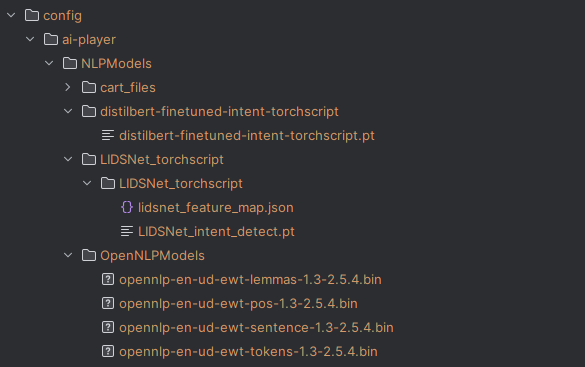
- These files are for a one-time download only, so it's only for the first time on using this version.
- Once in the game, if you used a different provider other than ollama in the JVM argument, use the config manager to select your desired LLM/provider and set their API keys.
- Type the following command to spawn your bot:
/bot spawn <yourBotName> <training|play>
training→ Spawns bot in training mode (does not connect to LLM).play→ Normal mode with full AI features.
Important Notes
- It’s best to create a separate modpack for this mod, since Ollama must run in the background whenever you play.
- Ollama itself uses minimal memory, so it shouldn’t affect performance significantly.
Web Search Tool
If you select the Gemini Search as the web search tool for the LLM, it will use the API key you have set as your LLM provider in the settings.json5 file automatically.
For https://serper.dev/ search, get an api key from serper.dev and then navigate to the config folder in game, open the ai_search_config.json and put the key:
In-Game Commands
Main Command:
/bot
Example Usage:
/bot spawn Steve training
The updated syntax comes courtesy of Mr. Álvaro Carvalho.
Since the mod depends on Carpet, you can also spawn bots using Carpet’s commands.
If you’re playing in offline mode, it’s recommended to use the mod’s built-in spawn command instead.
Important
Also remember that if you are using this mod, it's best to create a modpack for it's own as it will require you to run ollama server in the background every time you launch the game itself. Ollama server itself doesn't consume much memory so you should be fine.
Within the game
Main command
/bot
Sub commands:
A lot of the commands have been changed since the last version. Please check changelog of the latest version.
Example Usage:
/bot spawn Steve training
The above command syntax changes credits go to Mr. Álvaro Carvalho
And yes since this mod relies on carpet mod, you can spawn a bot using carpet mod's commands too and try the mod. But if you happen to be playing in offline mode, then I recommend using the mod's in built spawn command.