Logo
MINECRAFTBIBLE
Items
Items

All game items

Blocks
Blocks

Building blocks

Mobs
Mobs

Creatures & monsters

Biomes
Biomes

World biomes

Structures
Structures

Generated structures

Recipes
Recipes

Crafting guides

Advancements
Advancements

Achievements

Loot Tables
Loot Tables

Drop rates

Tags
Tags

Item groupings

All Versions
View all data →
Capes
Cape ArchiveNEW

Browse rare Minecon capes, OptiFine capes, and custom capes from players worldwide

Browse

Player Database
Player DatabasePopular

Search any player

Skin Browser
Skin Browser

Browse & download skins

Cape Gallery
Cape GalleryNEW

Minecon & OptiFine capes

Seed Vault
Seed Vault

Curated seeds

Learn

Guides
GuidesNew

Tutorials & tips

Blog
Blog

News & updates

Community

Community Hub
Community HubHub

Posts, discussions & more

All Versions
View community →
Seed Analyzer
Seed Analyzer

World seed analysis

Loot Explorer
Loot Explorer

Drop rates

Crafting Calculator
Crafting Calculator

Material planning

Enchant Calculator
Enchant Calculator

Probability math

Redstone Lab
Redstone Lab

Signal timing

Trading Profit
Trading Profit

Villager ROI

All Versions
View all tools →
Mods
Mods

Browse all mods

Plugins
Plugins

Server plugins

Resource Packs
Resource Packs

Textures & sounds

Shaders
Shaders

Visual enhancements

Datapacks
Datapacks

World logic

Scanner
Mod Intelligence

Scan & analyze any mod

All Versions
View all mods →
Loading...
IntroductionIntroductionVersion HistoryVersion HistoryGuidesGuidesBlog & NewsBlog & News
ItemsItemsBlocksBlocksMobsMobsRecipesRecipesBiomesBiomesStructuresStructuresAdvancementsAdvancementsLoot TablesLoot TablesTagsTags
ModsModsPluginsPluginsResource PacksResource PacksShadersShadersDatapacksDatapacks

MinecraftBible

The Ultimate Wiki

Logo
MINECRAFTBIBLE

The ultimate Minecraft reference. Every item, block, mob, and recipe documented with precision.

Community

  • Skin Browser
  • Cape Gallery
  • Seed Vault
  • Blog
  • Guides

Database

  • Items
  • Blocks
  • Mobs
  • Recipes
  • Biomes
  • Structures

Tools

  • Seed Analyzer
  • Mod Intelligence
  • Crafting Calculator
  • Enchant Calculator

Mods & Packs

  • Mods
  • Plugins
  • Resource Packs
  • Shaders
  • Datapacks

Site & Legal

  • About
  • Authors
  • Editorial Policy
  • Corrections
  • Contact
  • Privacy Policy
  • Terms of Service
  • DMCA
  • Sitemap

© 2026 MinecraftBible. Not affiliated with Mojang or Microsoft.

PrivacyTermsContact
Advancements Reloaded (AdvancementInfo)

ModMIT

Advancements Reloaded (AdvancementInfo)

Enhance your Minecraft advancements experience with a revamped UI that utilizes more of your screen space, especially at higher GUI scales. This mod is a continuation of the original AdvancementInfo mod by gbl marked as end-of-life since Jun 2024.

449.0K
Downloads
513
Followers
4 months ago
Updated
📦
30
Versions
utilityfabricforgeneoforgequilt
Download Latestv0.12.0+neoforge-1.21.11View on Modrinth

📖About Advancements Reloaded (AdvancementInfo)

advancement_reload_title

Overview

This mod significantly enhances the Minecraft advancements UI with a modern, expanded interface that makes full use of your screen. Features include:

  • Expanded UI - Utilizes most of your screen, especially on high GUI scales
  • Deterministic Ordering - No more random tab and advancement ordering
  • Powerful Search - Quickly find advancements and criteria across all tabs
  • Highly Configurable - Customize colors, layout, and ordering to your preference
  • Modpack Friendly - Full control over tab and advancement ordering for modpack creators
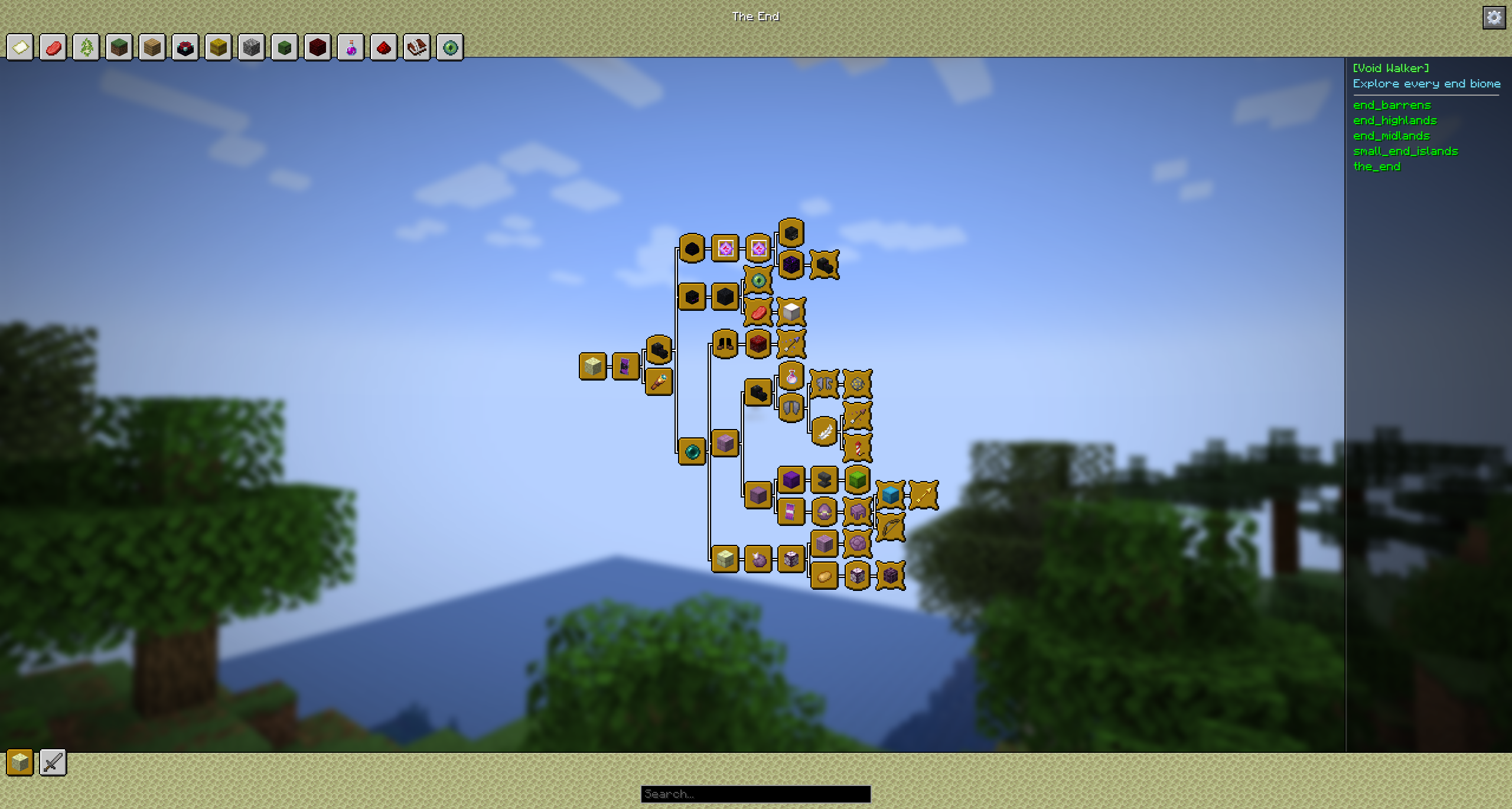
Example of the UI with BACAP

Background

I decided to revive and enhance the original AdvancementInfo mod, which was marked as end-of-life. Starting from scratch, I have reworked and improved the UI to make it more visually appealing.

Future updates will focus on further enhancing the overall advancements experience.

What's New

  • A completely new design that aligns with Minecraft's artistic direction.
  • Instantly search all achievements by title, description, or criteria in real time to quickly find exactly what you need.
  • Easier scrolling capabilities.
  • Memory retention of the selected achievement when the window is closed using the menu key (default: L).
  • Ability to close the achievement details, search result with the escape key.

Version and Compatibility

This mod is a continuation of the original AdvancementInfo mod, picking up from version 1.21 and beyond. It aims to keep the spirit of the original mod while adding significant improvements.

Known Issues

  • The mod may not work correctly with other mods that modify the advancements screen.
  • The setting "background style TRANSPARENT" not working correctly on Forge (works on NeoForge).

Not Implemented Yet

  • Configuration options are not yet available. Implemented in 0.2.0
  • Implement a search engine to locate criterias and advancements Implemented in 0.9.0
  • Implementing an API to allow datapack creators to customize the UI directly from their datapacks.
  • Advanced tracking of different triggers (e.g., mining 10 blocks will show 4/10 instead of just the trigger name mine_stone).
  • Achievement categories may display incorrectly on certain GUI scales. Implemented in 0.2.0 by configuration
  • Support of Forge, NeoForge and Quilt. Implemented in 0.5.0

Support and Sponsorship

If you enjoy using this mod and would like to support its development, please consider sponsoring via GitHub Sponsors or Patreon. Your support will help improve and maintain this project, allowing for more frequent updates and new features.

Special thanks

Special thanks to Gbl for her contributions so far on AdvancementInfo ❤️

👥 Team & Contributors

42atomys
42atomysOwner

⚙️ Compatibility

Environment
💻 Client-side
Loaders
fabricforgeneoforgequilt
Minecraft Versions
1.21.11

🔗 Links

Modrinth Page