Logo
MINECRAFTBIBLE
Items
Items

All game items

Blocks
Blocks

Building blocks

Mobs
Mobs

Creatures & monsters

Biomes
Biomes

World biomes

Structures
Structures

Generated structures

Recipes
Recipes

Crafting guides

Advancements
Advancements

Achievements

Loot Tables
Loot Tables

Drop rates

Tags
Tags

Item groupings

All Versions
View all data →
Capes
Cape ArchiveNEW

Browse rare Minecon capes, OptiFine capes, and custom capes from players worldwide

Browse

Player Database
Player DatabasePopular

Search any player

Skin Browser
Skin Browser

Browse & download skins

Cape Gallery
Cape GalleryNEW

Minecon & OptiFine capes

Seed Vault
Seed Vault

Curated seeds

Learn

Guides
GuidesNew

Tutorials & tips

Blog
Blog

News & updates

Community

Community Hub
Community HubHub

Posts, discussions & more

All Versions
View community →
Seed Analyzer
Seed Analyzer

World seed analysis

Loot Explorer
Loot Explorer

Drop rates

Crafting Calculator
Crafting Calculator

Material planning

Enchant Calculator
Enchant Calculator

Probability math

Redstone Lab
Redstone Lab

Signal timing

Trading Profit
Trading Profit

Villager ROI

All Versions
View all tools →
Mods
Mods

Browse all mods

Plugins
Plugins

Server plugins

Resource Packs
Resource Packs

Textures & sounds

Shaders
Shaders

Visual enhancements

Datapacks
Datapacks

World logic

Scanner
Mod Intelligence

Scan & analyze any mod

All Versions
View all mods →
Loading...
IntroductionIntroductionVersion HistoryVersion HistoryGuidesGuidesBlog & NewsBlog & News
ItemsItemsBlocksBlocksMobsMobsRecipesRecipesBiomesBiomesStructuresStructuresAdvancementsAdvancementsLoot TablesLoot TablesTagsTags
ModsModsPluginsPluginsResource PacksResource PacksShadersShadersDatapacksDatapacks

MinecraftBible

The Ultimate Wiki

Logo
MINECRAFTBIBLE

The ultimate Minecraft reference. Every item, block, mob, and recipe documented with precision.

Community

  • Skin Browser
  • Cape Gallery
  • Seed Vault
  • Blog
  • Guides

Database

  • Items
  • Blocks
  • Mobs
  • Recipes
  • Biomes
  • Structures

Tools

  • Seed Analyzer
  • Mod Intelligence
  • Crafting Calculator
  • Enchant Calculator

Mods & Packs

  • Mods
  • Plugins
  • Resource Packs
  • Shaders
  • Datapacks

Site & Legal

  • About
  • Authors
  • Editorial Policy
  • Corrections
  • Contact
  • Privacy Policy
  • Terms of Service
  • DMCA
  • Sitemap

© 2026 MinecraftBible. Not affiliated with Mojang or Microsoft.

PrivacyTermsContact
Advancement Info
ModMIT

Advancement Info

This mod enlarges the advancements UI to use most of your screen instead of just a tiny portion

11.0K
Downloads
32
Followers
6 months ago
Updated
📦
2
Versions
game-mechanicsmanagementutilityfabric
Download Latestv1.21.11-fabric-1.3.1View on Modrinth

📖About Advancement Info

Advancement Info Continued

This mod is a continuation of the abandoned Advancement Info mod, updated for Minecraft 1.21.9 and 1.21.10+.

Features

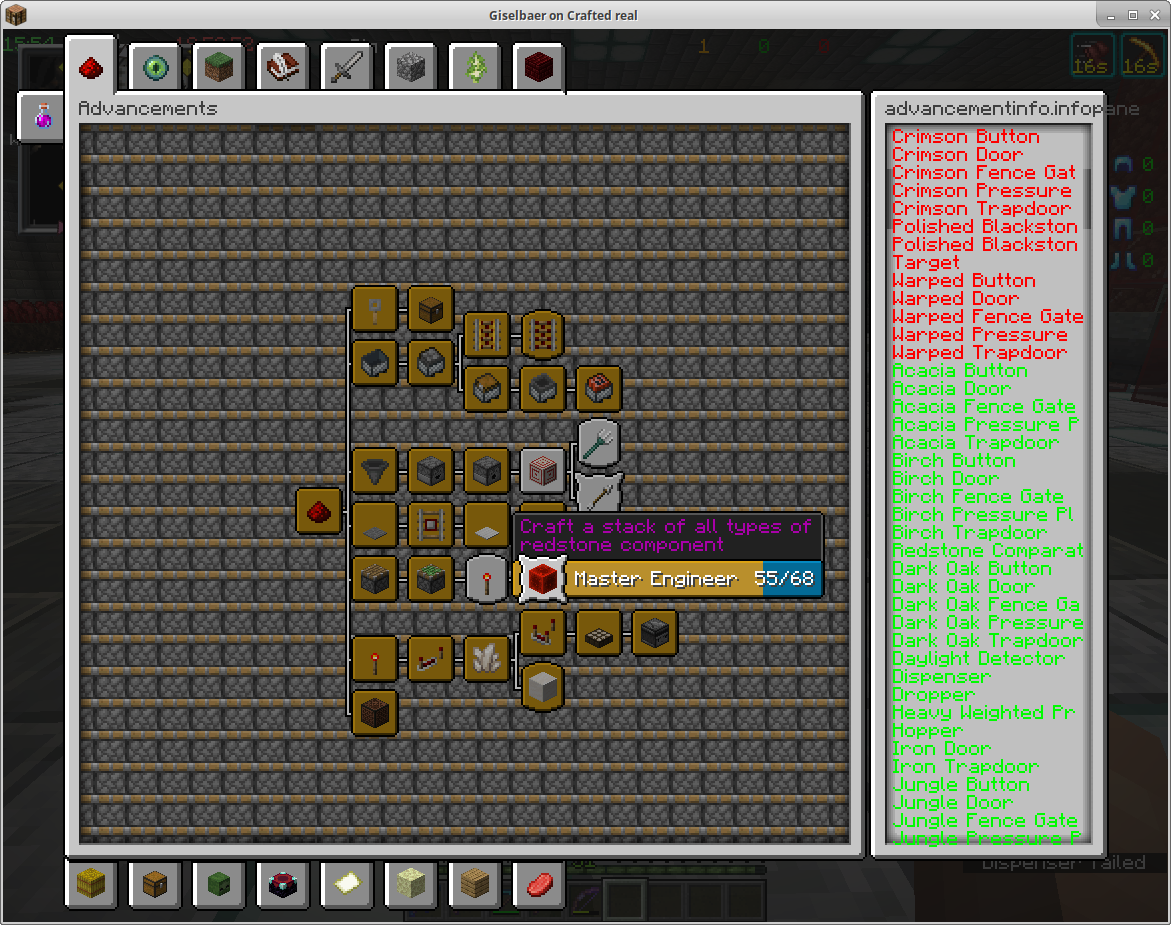
This mod enlarges the advancements UI to use most of your screen instead of just a tiny portion, especially beneficial when your GUI scale is high. This means more information visible at the same time, less scrolling, and a better overview of your progress.

The mod analyzes which advancement requirements you've completed and which remain unfinished, displaying a comprehensive list to the right of the UI. This makes it significantly easier to track what you've accomplished and what still needs to be done.

For example, the "Discover every Biome" advancement doesn't tell you which biomes are still missing—this mod will help you identify that last biome you haven't visited yet.

This works seamlessly with data pack advancements as well. Here's an example from BlazeAndCave:
Screenshot

If the list on the right overflows, you can use your mouse scroll wheel to scroll through it.


Advancements and their objectives have their own internal names, which may or may not correspond to Minecraft items, blocks, or entities. The mod does its best to map those names to Minecraft objects, but in some cases—especially with data packs—that's not possible. The mod will display the internal name in those cases, hoping you can decipher what's needed better than the mod itself.

For example, the objective of "The Parrots and the Bats" is named "bred", which will show as bred in the info box.

How to Use

  1. Download the mod from the releases page
  2. Place the .jar file in your mods folder
  3. Launch Minecraft with Fabric
  4. Open the Advancements screen (default: L key)
  5. Hover over any advancement to see its objectives in the right panel
  6. Use the search bar at the top to find specific advancements
  7. Scroll in the right panel to see all objectives

Minecraft Version Support

This mod supports Minecraft 1.21.9 and 1.21.10+.

For older Minecraft versions, please check the original Advancement Info mod page for compatible versions.

Requirements

  • Fabric Loader
  • Fabric API 0.134.0+

Optional Dependencies

  • Cloth Config API (for in-game configuration)
  • Mod Menu (for better mod management)

To ensure optimal performance, this mod has been optimized using JProfiler Logo.

👥 Team & Contributors

UltimateGamerMC
UltimateGamerMCOwner

⚙️ Compatibility

Environment
💻 Client-side
Loaders
fabric
Minecraft Versions
1.21.11

🔗 Links

Modrinth Page