

Accessorify
Makes some vanilla items more useful using the Accessories API
📖About Accessorify
Accessorify
This mod lets you equip some vanilla items as accessories using Accessories, adding new functionality and saving up inventory space.
You can choose which items will be turned into accessories in the configuration menu, among some other configuration options, if you want to pick and choose. By default, all of the items listed below are turned into accessories.
Both Fabric and NeoForge versions require Fzzy Config and Accessories and all of its dependencies. A dynamic lights mod such as LambDynamicLights is required for the lantern accessory to emit light around the player.
The configuration menu can be accessed using ModMenu on Fabric, and the built-in Mods menu on NeoForge.
Since version 2.2.1, Accessorify now works on Forge for Minecraft 1.20.1 using Sinytra Connector. Tested on Forge 47.4.8 with the following setup:
accessories-neoforge-1.0.0-beta.46+1.20.1accessorify-2.2.1+1.20.1cloth-config-11.1.136-forgeConnector-1.0.0-beta.46+1.20.1fabric-api-0.92.6+1.11.14+1.20.1fzzy_config-0.7.2+1.20.1+forgekotlinforforge-4.11.0-all
Slot modes
Accessories from Accessorify can be equipped in a few different ways depending on what you need by selecting one of the slot modes:
- Default slot mode: Accessories are equipped in the default accessory slots (cape, belt, wrist etc.), and copies of the occupied accessory slots will be created as they're populated. This is the default behavior, and is useful in modpacks where other mods use the same accessory slots.
- Default slot mode without copy: Same as default slot mode, but slot copies won't be created. Useful if you don't need the additional slots, but still want to use the default accessory slots.
- Unique slot mode: Each accessory added by the mod gets its own unique slot instead of using default slots (arrows and shulker boxes use unique slots regardless of selected slot mode). Useful for both heavily modded and "vanilla+" packs, but introduces a bunch of new slots.
From left to right: Default slot mode; Default slot mode without copy; Unique slot mode
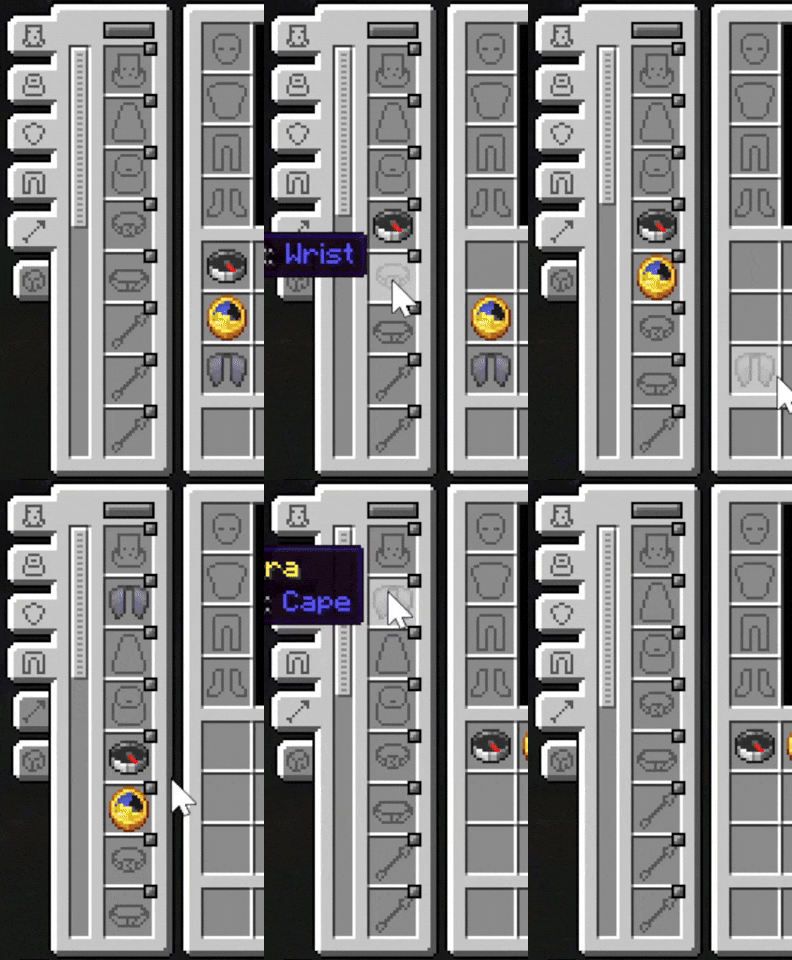
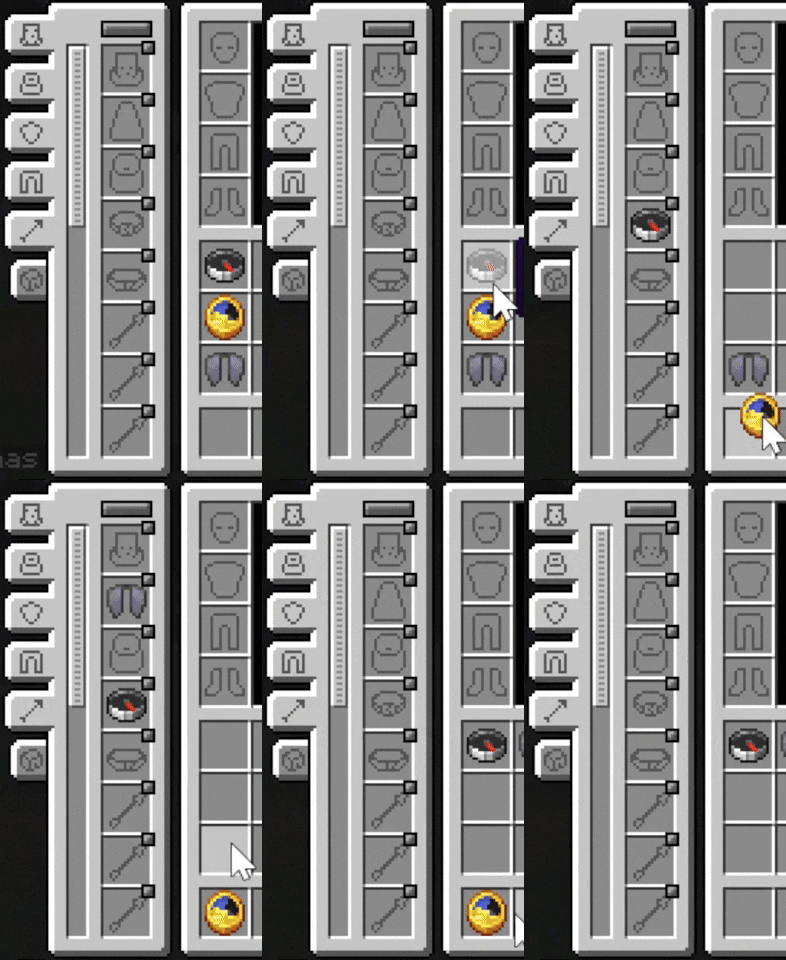
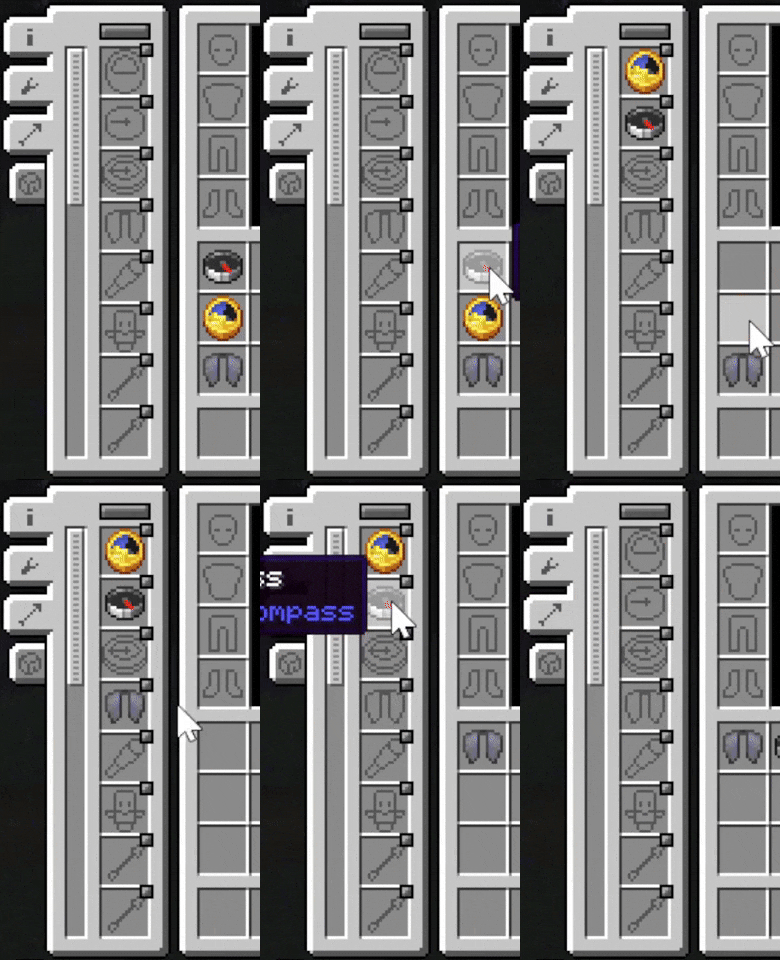
The accessories
Clock, compass, recovery compass
Can now be equipped in the Wrist slot, or their respective slots in unique slot mode.
When equipped, relevant info will be shown in the top left corner of the screen:
- Compass: coordinates, heading, biome
- Clock: time and day, weather, moon phase, season (if a season mod is installed)
- Recovery compass: last death coordinates
Overlay appearance can be extensively configured in the configuration screen, such as which information to display, text background, shadow and color.
For a more refined and visually appealing overlay, Immersive Overlays can be used. Accessorify's compass and clock overlay will be replaced by this mod.
There is also an option to hide information shown by the accessories from the F3 debug screen in survival mode, so that they are the only sources of such information.
Elytra
Can now be equipped in the Cape slot, or the Elytra slot in unique slot mode.
There is no additional functionality, but it frees up the chest slot so you can equip both a chestplate and the Elytra at the same time.
Totem of Undying
Can now be equipped in the Charm slot, or the Totem slot in unique slot mode.
When equipped, the totem will be triggered and consumed to save you from death, as if you were holding it in your hands.
Spyglass
Can now be equipped in the Belt slot, or the Spyglass slot in unique slot mode.
When equipped, pressing and holding C (default keybind, configurable) uses the spyglass to zoom in. Using the scroll wheel while zooming in with the spyglass changes the zoom level.
Lantern
Can now be equipped in the Belt slot, or the Lantern slot in unique slot mode.
When equipped, the lantern will show up on the player and emit light matching the lantern's light level. A dynamic lights mod needs to be installed for the lantern to emit light.
Ender chest
Can now be equipped in the Back slot, or the Ender Chest slot in unique slot mode.
When equipped, pressing V (default keybind, configurable) opens the player's ender storage.
Shulker boxes
Can now be equipped in the Shulker slot, which is added by this mod.
When equipped, holding X (default keybind, configurable) brings up a shulker box selection widget. Scrolling with the mouse wheel while the widget is open selects which shulker box to open. Holding the sneak key shows the tooltip of the currently selected shulker box. Releasing the keybind opens the selected shulker box. The selection is saved, so opening the shulker box you previously opened only requires pressing X. Having one shulker box equipped skips the widget and immediately opens it. By default you have 3 shulker slots. If you want more (or less), follow the instructions near the bottom of the page.
Arrows
Can now be equipped in the Arrow slot, which is added by this mod. Modded arrows are supported if the mod adds them to the minecraft:arrows tag.
When holding a ranged weapon, holding X brings up an arrow selection widget. Scrolling with the mouse wheel while the widget is open selects the arrow slot to be used by the weapon. Releasing the sneak key closes the widget. By default you have 3 arrow slots. If you want more (or less), follow the instructions near the bottom of the page.
Configuring shulker box and arrow slot amounts
Open the Accessories config (NOT Accessorify) in-game, scroll down until you see "Slot Amount Modifiers" and do the following:
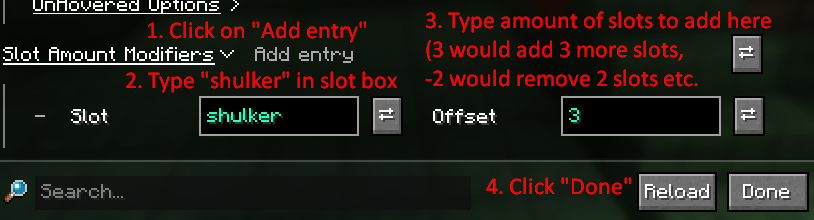
Type arrow in the slot box instead to modify the amount of arrow slots in the same manner.
Mod compatibility
- Additional Lanterns: Lanterns added by the mod equippable in Belt/Lantern slot and emit light with a dynamic lights mod installed
- Deeper and Darker: Soul Elytra equippable in Cape/Elytra slot
- Friends and Foes: Totem of Freezing and Totem of Illusion equippable in Charm/Totem slot
- Reinforced Shulker Boxes: Reinforced shulkers equippable in Shulker slot and can be opened like vanilla shulkers
- Ars Elixirum: Witch Totems equippable in Charm/Totem slot
- Serene Seasons or Fabric Seasons + Fabric Seasons Extras: Calendar equippable in the Charm/Calendar slot and shows the current season in the info overlay
- Notes: If "Hide gameplay info from F3 menu in survival" is on, the buttons used to add info such as coordinates to notes will be disabled unless you have a compass equipped