Minecraft Plugin
Simple Voice Chat by henkelmax
A working voice chat in Minecraft!
Downloads: 59670636 · Followers: 13121 · updated 2 weeks ago · Latest: 62MVmInV
About Simple Voice Chat
Simple Voice Chat is a Minecraft plugin published on Modrinth by henkelmax. A working voice chat in Minecraft!
On the technical side, Simple Voice Chat ships for Bukkit, BungeeCord, Fabric, Folia and 8 more platforms. Installs on both client and server (or has optional server integration).
Simple Voice Chat maintains compatibility with 43 Minecraft releases, from Minecraft 1.12 up to Minecraft 26.2. Always download the file that matches your Minecraft version, and re-check the version dropdown after any Mojang release to avoid crash-on-launch bugs.
Content-wise, Simple Voice Chat is categorized as Adventure, Social, and Utility. That means it fits neatly into a wider Minecraft plugin category so you can pair it with other plugins from the same tag on this site.
Popularity: Simple Voice Chat has been downloaded 59.7M times on Modrinth and was updated 2 weeks ago. Large download counts combined with recent updates are a strong signal that henkelmax is actively maintaining Simple Voice Chat.
Full description (from henkelmax)
[Modrinth](https://modrinth.com/mod/simple-voice-chat) | [CurseForge](https://legacy.curseforge.com/minecraft/mc-mods/simple-voice-chat) | [Discord](https://discord.gg/4dH2zwTmyX) | [Wiki](https://modrepo.de/minecraft/voicechat/wiki) | [FAQ](https://modrepo.de/minecraft/voicechat/faq) | [Credits](https://modrepo.de/minecraft/voicechat/credits) | [API](https://modrepo.de/minecraft/voicechat/api)
# Simple Voice Chat
A proximity voice chat for Minecraft with a variety of [addons](https://modrepo.de/minecraft/voicechat/addons) that offer additional features and functionalities.
⚠️ **NOTE** This mod requires special setup on the server in order to work. Please read the [wiki](https://modrepo.de/minecraft/voicechat/wiki/setup) for more information.
<p align="center"> <a href="https://discord.gg/4dH2zwTmyX"> <img src="https://cdn.modrinth.com/data/cached_images/5ac8884b3c4916cbac2b514220b9bb678db039b7.png" width="300"> </a> <br/> <i>Please join the Discord if you have questions!</i> </p>
Downloads
- [Fabric](https://modrinth.com/mod/simple-voice-chat/versions?l=fabric)
- [NeoForge](https://modrinth.com/mod/simple-voice-chat/versions?l=neoforge)
- [Forge](https://modrinth.com/mod/simple-voice-chat/versions?l=forge)
- [Bukkit/Spigot/Paper](https://modrinth.com/plugin/simple-voice-chat/versions?l=bukkit)
- [Quilt](https://modrinth.com/mod/simple-voice-chat/versions?l=quilt)
- [Velocity](https://modrinth.com/mod/simple-voice-chat/versions?l=velocity)
- [BungeeCord/Waterfall](https://modrinth.com/mod/simple-voice-chat/versions?l=bungeecord)
Features
- Push to talk
- Voice activation
- Proximity voice chat
- Password protected groups
- Automatic voice activity detection
- Automatic microphone gain adjustment
- [Opus codec](https://opus-codec.org/)
- [RNNoise](https://jmvalin.ca/demo/rnnoise/) recurrent neural network noise suppression
- OpenAL audio
- Cross compatibility between Fabric, NeoForge, Forge, Quilt, Bukkit, Spigot and Paper
- Support for Velocity, BungeeCord and Waterfall
- Compatibility with [ModMenu](https://modrinth.com/mod/modmenu) (Use [ClothConfig](https://modrinth.com/mod/cloth-config) for a better configuration UI)
- Configurable push to talk key
- Microphone and speaker test playback
- Configurable voice distance
- Whispering
- Individual player volume adjustment
- Microphone amplification
- 3D sound
- AES encryption
- Audio recording with separate audio tracks
- A powerful [API](https://modrepo.de/minecraft/voicechat/api)
- Many [addons](https://modrepo.de/minecraft/voicechat/addons)
Icons
| Icon | Description | |:------------------------------------:|-------------------------------------------------------| |  | You are talking | |  | You are whispering | |  | Player is talking | |  | Player is whispering | |  | Microphone muted | |  | Voice chat disabled | |  | Voice chat not connected<br/>Voice chat not installed |
The GUI
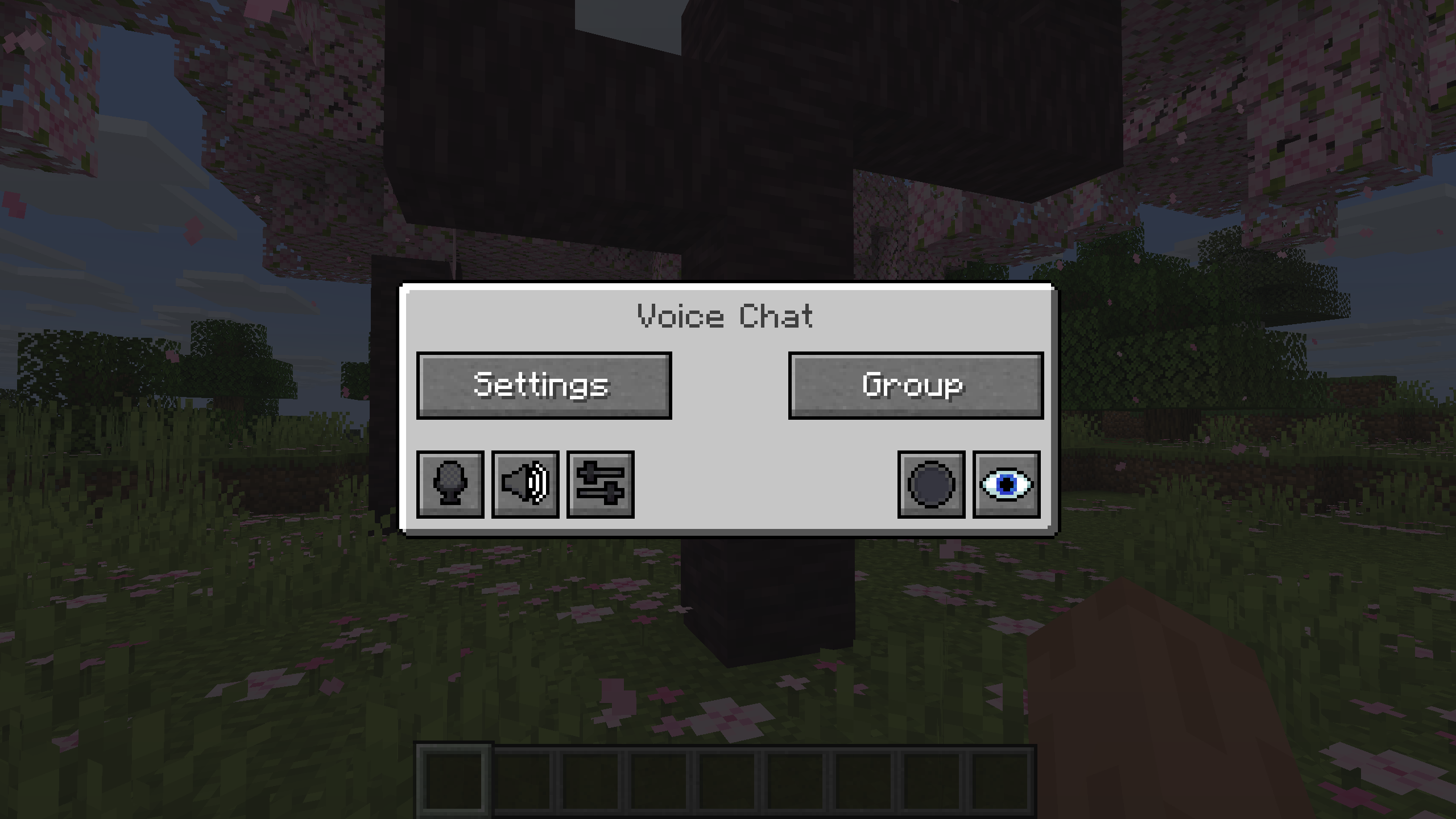
You can open the voice chat GUI by pressing the `V` key. This allows you to open the settings, group chats, mute yourself, disable the voice chat, start/stop a recording and hide all icons.
Group Chats
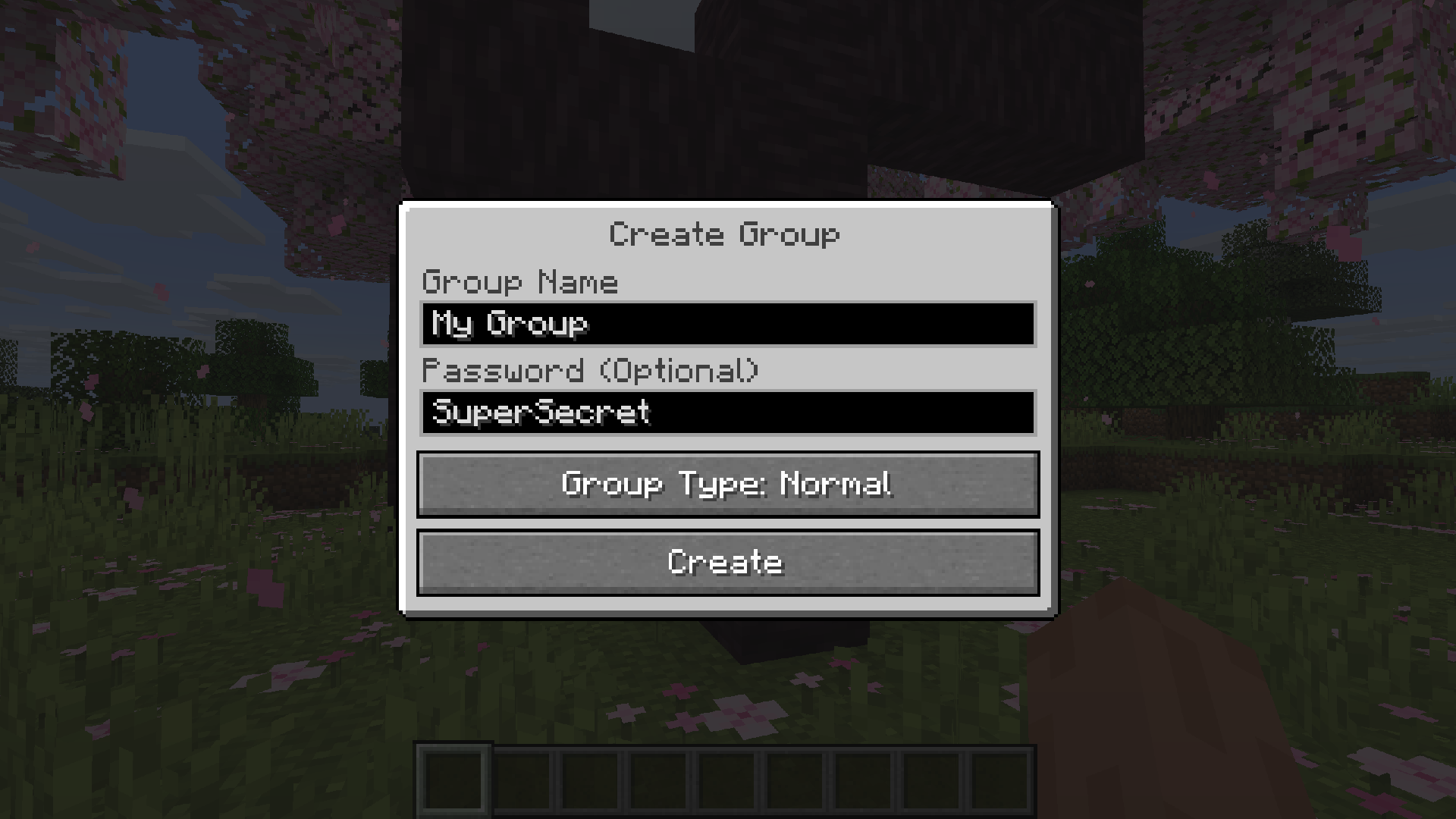
Group chats allow you to talk to players that are not in your vicinity. To open the group chat interface, either press the group button in the voice chat GUI or just press the group key.
To create a new group, just type a name in the text field and press the button at the bottom.
Creating or joining a group will bring you into the group chat interface. You will also see the heads of the group members in the top left corner of your screen. Talking players will be outlined. You can disable these icons by pressing the third button from the left.
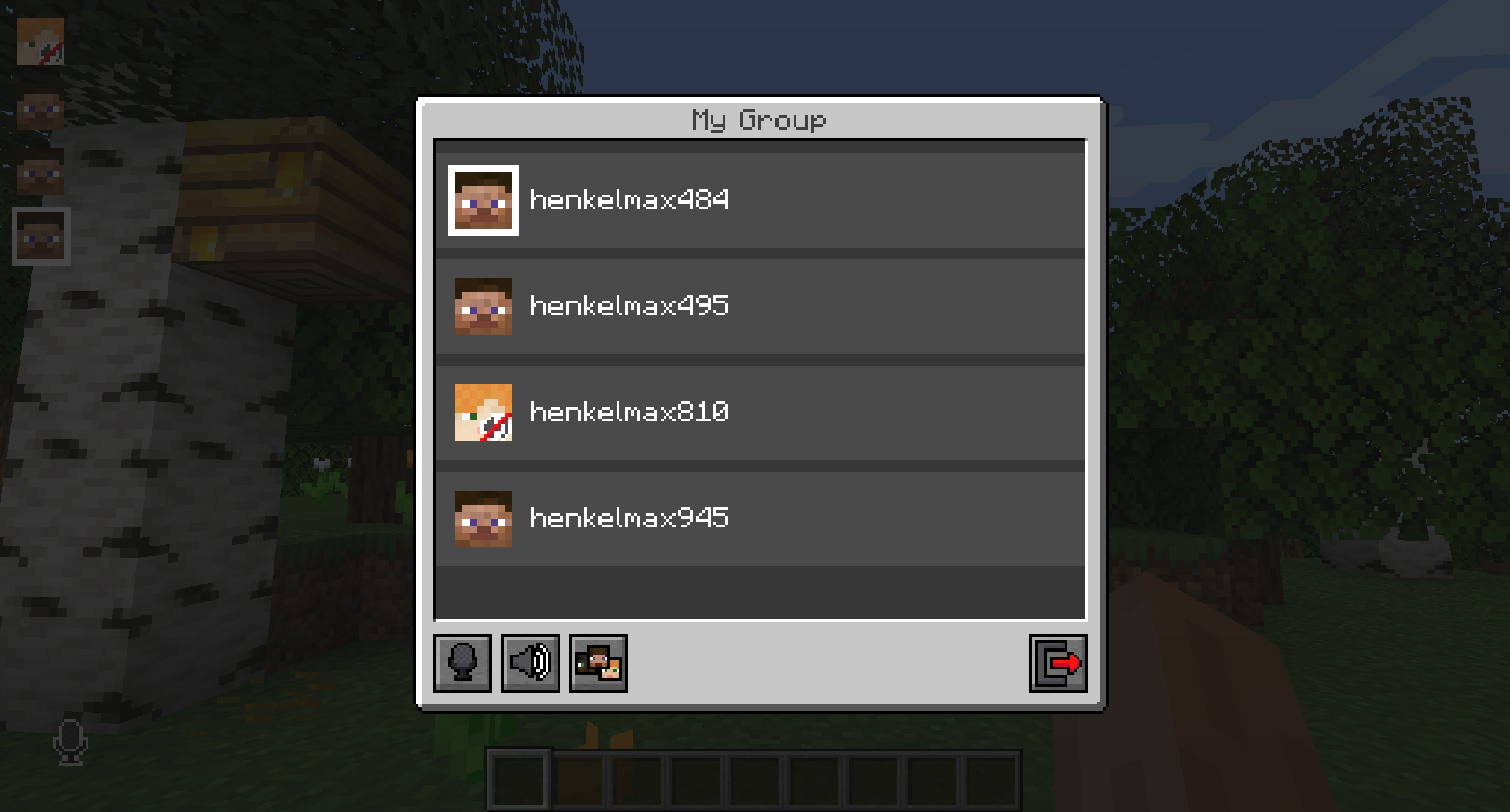
Players that are not in a group will see a group icon next to your head, indicating that you are in a group.
You can invite players to your group chat by entering the command `/voicechat invite <playername>` or from the social interactions screen.
Settings
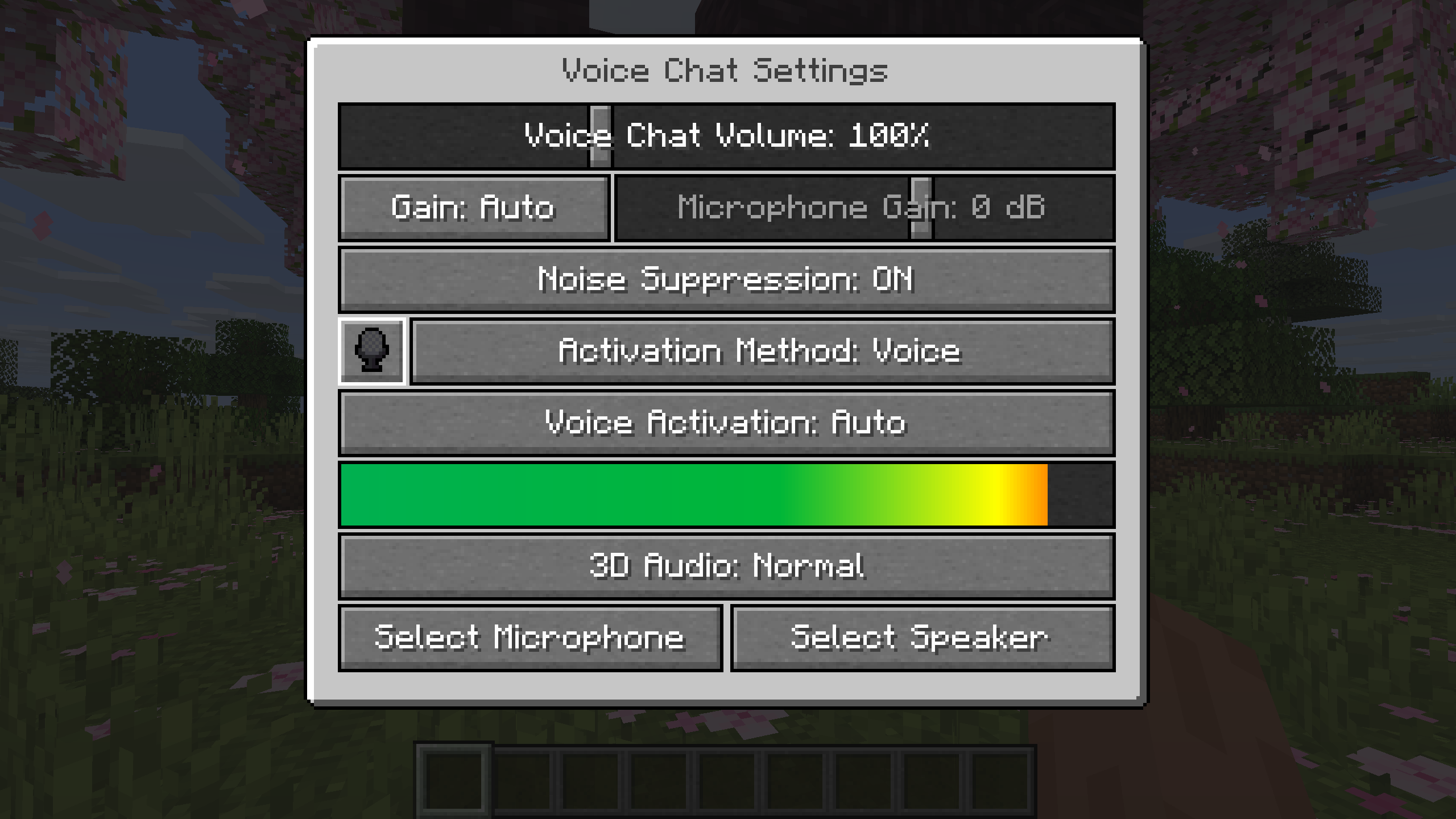
You can access the voice chat settings by pressing the `V` key and pressing the settings button.
This menu offers the ability to set up your voice chat audio settings.
By clicking the microphone button, you can test your microphone activation.
Important Notes
You need to open a port on the server. This is port `24454` `UDP` by default. Without opening this port, the voice chat will not work. This port can be changed in the server config. More information [here](https://modrepo.de/minecraft/voicechat/wiki/setup).
The voice chat is encrypted, but we don't guarantee the security of it. Use at your own risk!
Compatibility & requirements
Environment: Client + server — Installs on both client and server (or has optional server integration).
Loaders / platforms: Bukkit, BungeeCord, Fabric, Folia, Forge, NeoForge, Paper, Purpur, Quilt, Spigot, Velocity, Waterfall
Supported Minecraft versions (43): 26.2, 26.1.2, 26.1.1, 26.1, 1.8.8, 1.21.9, 1.21.8, 1.21.7, 1.21.6, 1.21.5, 1.21.4, 1.21.3, 1.21.2, 1.21.11, 1.21.10, 1.21.1, 1.21, 1.20.6, 1.20.5, 1.20.4, 1.20.3, 1.20.2, 1.20.1, 1.20, 1.19.4, 1.19.3, 1.19.2, 1.19.1, 1.19, 1.18.2, 1.18.1, 1.18, 1.17.1, 1.17, 1.16.5, 1.16.4, 1.16.3, 1.16.2, 1.16.1, 1.16, 1.12.2, 1.12.1, 1.12
Categories: Adventure, Social, Utility
How to install Simple Voice Chat
- Match your Minecraft version. Confirm the file you download from Modrinth is tagged for Minecraft 26.2.
- Place the .jar into your server's plugins folder. Restart the server and run
/pluginsto verify. - Launch and verify. Start Minecraft (or your server) and check Simple Voice Chat appears in the mods / plugins / resource packs list.
Frequently asked questions about Simple Voice Chat
Which Minecraft versions does Simple Voice Chat support?
Simple Voice Chat lists support for 43 Minecraft versions. The most recent supported release is Minecraft 26.2, with older support running back to Minecraft 1.12. Always match the version of the file you download to the Minecraft version your world or server is running.
What mod loader or server platform do I need to run Simple Voice Chat?
Simple Voice Chat publishes files for Bukkit, BungeeCord, Fabric, Folia, and 8 more. Install the matching loader (for example, Fabric Loader for Fabric builds or PaperMC for Paper plugins) before dropping Simple Voice Chat into your mods, plugins, or resource-pack folder.
Does Simple Voice Chat need to be installed on my Minecraft server?
Simple Voice Chat supports installation on both the client and the server. For full functionality (like synced world features or client-side rendering), install it on both sides.
Who created Simple Voice Chat?
Simple Voice Chat is published on Modrinth by henkelmax. The project was first published 1731 days ago. All files are hosted and moderated by the Modrinth team, and henkelmax's Modrinth profile links to every other project they maintain.
Is Simple Voice Chat still being updated?
Yes — Simple Voice Chat was updated 2 weeks ago on Modrinth. Regular updates from henkelmax generally indicate active maintenance and quicker patches for Minecraft version bumps.
Is Simple Voice Chat safe to download from Modrinth?
Yes. Modrinth moderates every file that henkelmax uploads for Simple Voice Chat. Files are virus-scanned and reviewed against Modrinth's content policy before publication. Downloading Simple Voice Chat directly from its Modrinth page is the recommended way to avoid malware-laced mirrors. Never install plugin files from unknown third-party sites.
How popular is Simple Voice Chat?
Simple Voice Chat has been downloaded 59,670,636 times (59.7M) on Modrinth and has 13,121 followers tracking new releases. High download counts and active follower bases are strong signals of a trustworthy, well-maintained Minecraft plugin.
What license does Simple Voice Chat use?
Simple Voice Chat is distributed under the LICENSEREF-ALL-RIGHTS-RESERVED. Read the license on the Modrinth project page before redistributing, forking, or bundling Simple Voice Chat into a modpack.
Plugins similar to Simple Voice Chat
- TAB — An all-in-one solution that works (1.0M downloads)
- mclo.gs — Paste, share & analyse your Minecraft logs (429.5k downloads)
- SkinsRestorer — 🎨 Ability to restore/change skins on servers! (Offline and Online Mode) (1.4M downloads)
- Plasmo Voice — A proximity voice chat mod with audio positioning and lots of features (3.6M downloads)
- LuckPerms — A permissions plugin/mod for Minecraft servers. (2.3M downloads)
- Voice Messages — Voice messages in minecraft chat (239.4k downloads)
- VeinMiner — Mine the whole vein on mining a single ore/block. Make the tedious mining experience to something satisfying and fun! (66.6M downloads)
- Customizable Player Models — Customize your minecraft avatar! (2.7M downloads)
Official links
Source, safety, and licensing
Simple Voice Chat is indexed by MinecraftBible directly from the official Modrinth REST API. All files are hosted on Modrinth, which virus-scans and moderates every upload from henkelmax before publication. Downloading through Modrinth is the recommended safe path — never install plugin files from unknown mirrors.
License: LICENSEREF-ALL-RIGHTS-RESERVED (LicenseRef-All-Rights-Reserved).
Freshness signal: Simple Voice Chat was updated 2 weeks ago, which is a positive sign of active maintenance.
Author profile: Visit henkelmax's Modrinth profile to see every other project they maintain.
Explore related Minecraft Server Plugins
Browse the full catalog of Minecraft Server Plugins ranked by lifetime downloads on MinecraftBible.